
Microsoft has been migrating Teams private channel data from participant mailboxes to new dedicated channel Group mailboxes since September 2025 and started deleting the ownerless or archived channels June 5th. Redgrave LLP’s John Collins wrote an excellent summary of the changes and the potential impact on holds, compliance and eDiscovery. All of this raises the risk of inadvertent loss of Teams communications for private channels (where I tend to find the relatively ‘unguarded’ conversations). While the new Purview eDiscovery UI now allows the user to see M365 Groups owned by a target Custodian, it is a manual process that does not align with many common decision scoping workflows. That makes a complete export/report of all M365 Groups (SP/Teams) an essential tool for remediating or scoping holds and collections.
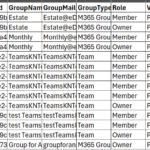
Group Report Example
In my ongoing AI coding testing, I created Powershell scripts and documentation as proof of concept for a client. It was a fun exercise with more than just private channels in mind. I had demo’d Five Star Legal’s eDig365 Reporter recently and knew that it provided all of this functionality and more. However, I know that client IT teams always seem to require testing the free Powershell options before buying a reasonably priced solution from the Microsoft store. The script package took some debugging, but worked in my test tenant. Right after I delivered that to the client, I found that Tony Redmond had updated his decade old Powershell script to track M365 Group changes. Since I trust Tony’s Powershell code over my Claude Code work, I pointed the client at his GitHub link and wrote off the time.
That gives you a traditional Powershell option from a reliable source. The M365 Group list is just the start. You will need to use a DB or Excel to cross reference your holds/custodians to the potential sites that they owned or were members of. Remember that Microsoft has no memory, so the report does not tell you WHEN that custodian joined that site or whether a custodian was a member during your case relevant time frame. That is a good reason to look at mature products like the eDig365 Reporter to track these things on an ongoing basis within your tenant.
I strongly recommend using this exercise to perform annual quality control checks to make sure that the holds in your matter management or external eDiscovery platform match to the new Purview eDiscovery hold report. In the past I have had to use Powershell for a list of sources on hold. The new report is much easier, though I have had inquiries asking if it was fully accurate. Guess I will be doing more testing. Trust but verify.
To wrap up, you ‘can’ use Powershell, Power Automate, a Copilot agent or other methods to track M365 Groups and make sure that the potentially relevant Groups are included in your eDiscovery scope. For corporations with substantial litigation profiles I recommend investing in a mature solution that will be kept up to date with Microsoft’s rapid development pace. Message if you want a copy of my script or want to talk shop. I managed to wrap the complex cases I was coordinating and have more bandwidth to research and projects.
Greg Buckles wants your feedback, questions or project inquiries at Greg@eDJGroupInc.com. Reach out for a free 15 minute ‘Good Karma’ call if he has availability. He solves problems and creates eDiscovery solutions for enterprise and law firm clients.
Greg’s blog perspectives are personal opinions and should not be interpreted as a professional judgment or advice. Greg is no longer an investigative journalist and all perspectives are based on best public information. Blog content is neither approved nor reviewed by any providers prior to being published. Do you want to share your own perspective? Greg is looking for practical, professional informative perspectives free of marketing fluff, hidden agendas or personal/product bias. Outside blogs will clearly indicate the author, company and any relevant affiliations.
Greg’s latest nature, art and diving photographs on Instagram.